Accept Payment FAQ
This section is designed to answer common questions related to the integration for and use of Flip for Business Accept Payment API.
What is the difference between redirect_url and Callback URL?
The redirect_url is used to direct your customer to a specified page after they have successfully completed the payment, applicable if you are using Step 1 or Step 2 integration. You can set the redirect_url in the Create Bill Request.
The Callback URL is used by Flip to send a status notification or callback to your URL once the customer has paid the transaction or if the transaction expires. To configure the Callback URL, follow these steps.
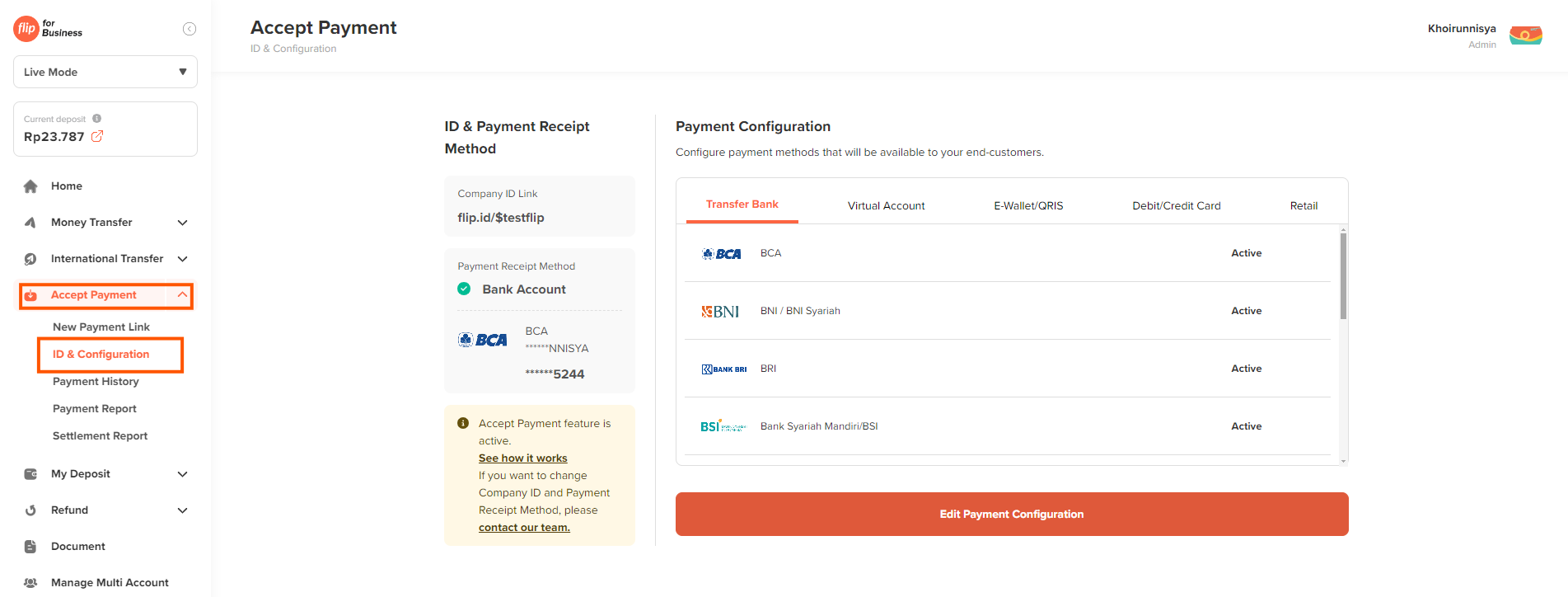
I want to know which Payment Channels that already activated for Accept Payment?
You can check which Payment channels that already active in the Flip for Business Dashboard. Go to Accept Payment menu > ID & Configuration.
Why am I getting response 500 INTERNAL_SERVER_ERROR while Create Bill?
This error typically occurs due to an intermittent issue on Flip's side. If you encounter this error, we recommend retrying the create bill request after a short while.
If the error persists, please contact our support team at support@flip.id or the B2B API Integration team, providing the relevant details :
- Flip for Business Company ID :
- Environment :
- API Endpoint :
- Issue :
- Log request and response :
Why am I receiving error 1091: "Cannot create transaction with chosen bank because it's not enabled"?
This error occurs when you try to create a transaction with a payment method that hasn’t been enabled for your account yet. This may happen if the bank isn't available for the transaction type you're processing, or it hasn't been activated in your account settings.
Additionally, please ensure that when using Step 3 integration, the parameters sender_bank and sender_bank_type are correctly set, as explained on the following page.
To fix this, make sure the bank is enabled for your account, or reach out to your Sales PIC or B2B API Integration team for help.
Why haven't I received the callback even though the transaction is already paid?
If you haven't received the callback despite the transaction being paid, it could be due to a few reasons:
- Callback URL issue : Verify that the callback URL you provided is correct and accessible, and ensure your server is returning an HTTP status code 200.
- Delayed Callback : Sometimes there may be a slight delay in sending the callback after the transaction is completed. If the issue continues and your customer has proof of payment, please reach out to our Support team at support@flip.id or the B2B API Integration team for further assistance.
What should I do if I don't store my customers' emails, but the Create Bill API requires a unique sender_email for each customer?
Yes, the Create Bill API requires a unique sender_email for each customer. If you don’t store customer emails, you can use a dummy email to create the bill. For example:
Why my transaction status is still PENDING in the Flip for Business dashboard?
Your transaction status may still Pending could be because your customer hasn't completed the payment yet. Please verify that they have made the payment. If they have paid and can provide proof of payment, kindly reach out to our support team for further assistance.
What is the difference between Status and Settlement Status?
Status refers to transaction status, it could be PENDING, FAILED, or SUCCESSFUL.
- PENDING means the transaction hasn't beeed paid by the customer.
- FAILED means the transaction was unsuccessful.
- SUCCESSFUL means the transaction has been successfully paid by the customer.
Settlement status refers to the process of settling funds from Flip to the merchant.
- Pending the transaction has been paid, but the funds haven't been settled to the merchant yet. This usually occurs after the settlement cycle on Business Day+1.
- Settled the funds have been successfully settled to the merchant's bank account.
- Cancelled the transaction was canceled or expired, so no funds will be settled to the merchant's account.